
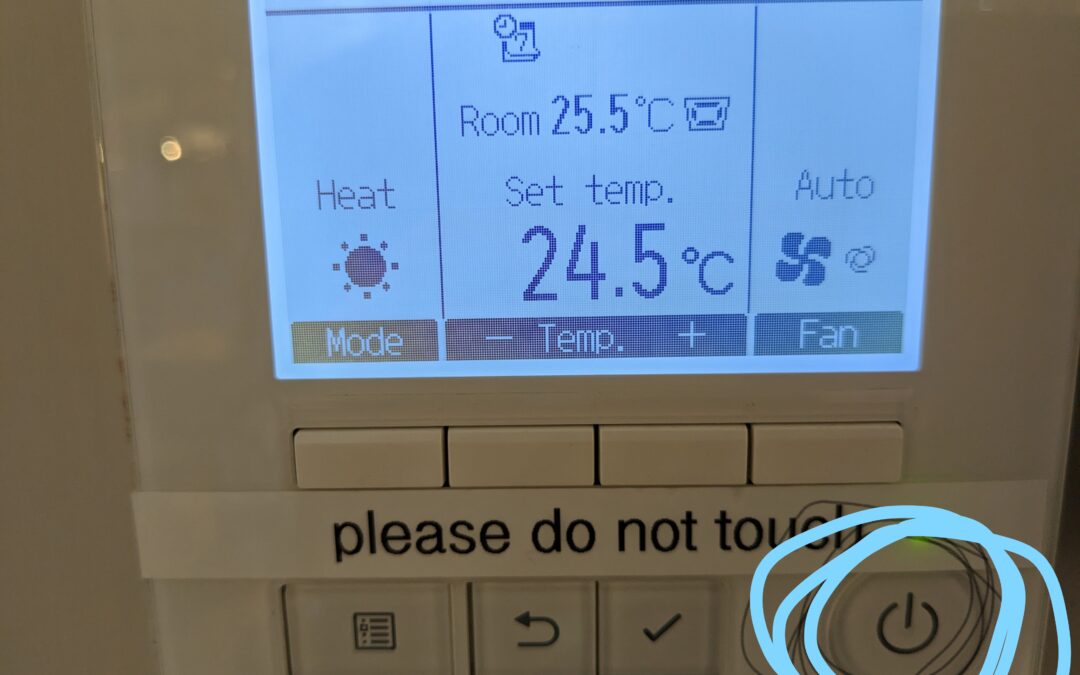
In this really hot weather, it’s nice to open the doors of the library to the open air. The last advice you had on this was that it was not allowed, due to causing problems with the heating/air conditioning.
Since the system was serviced in April, we now know how to manage the system better. It is now OK to open doors, so long as you make sure you follow ALL OF THESE STEPS FIRST.
- SWITCH ALL HEATING SYSTEM CONSOLES TO OFF. In the picture above that’s the one ringed in blue marker. When it’s OFF, you will not see anything on the display screen.
- ENSURE THAT ALL CONSOLES ARE SWITCHED TO OFF IF ONE IS SWITCHED TO OFF. If you have one OFF and the rest ON, the system breaks. £300 call-out.
- WHEN YOU LEAVE, SWITCH ALL CONSOLES BACK ON. iN HOT WEATHER, SET TO COOL, IN COLD WEATHER, SET TO HEAT.
- ALTERNATIVELY, IN HOT WEATHER, KEEP ALL DOORS CLOSED, SWITCH ALL CONSOLES ON AND MAKE SURE ALL ARE SET TO COOL BY TOGGLING THROUGH THE MODE SETTINGS (FAR LEFT BUTTON)
I’m not going to remove the PLEASE DO NOT TOUCH label as we don’t want hirers fiddling with things.
Anyone not clear, please ask.