
You will have noticed that there are new window sign-holders in the library. These were introduced to reduce the use of sticky stuff on the windows.
There are two sizes of displays – A4 and A3. The way they work is through static. There is no actual adhesive on the display. There are static-attracted strips at top and bottom of each display unit. These are the strips that stick the display to the window.
I know that some of you have had difficulty with making the displays stick, so I’ve contacted the manufacturer and obtained this useful set of instructions and a video showing how the displays should be used.
I would like to add that I’ve found several displays torn in two – they are not that robust, so please take care when separating the two sides of the display and be careful not to tear them. They are also quite dear – so mistakes are costly. Be gentle. If treated kindly they will last and be reusable infinitely. I hope everyone agrees the windows look a lot neater since they were introduced. Full instructions (for both A3 and A4 versions) follow. Please note the displays can only be used in portrait mode, not landscape.
Step by Step Guide
- Ensure the glass surface that you will be attaching your poster to is clean./li>
- Insert your poster into the poster sleeve, ensuring it sits between the two pieces of PVC.
- Place the poster sleeve against your window, ensuring that the static tape is facing towards the window and the poster is in a portrait position.
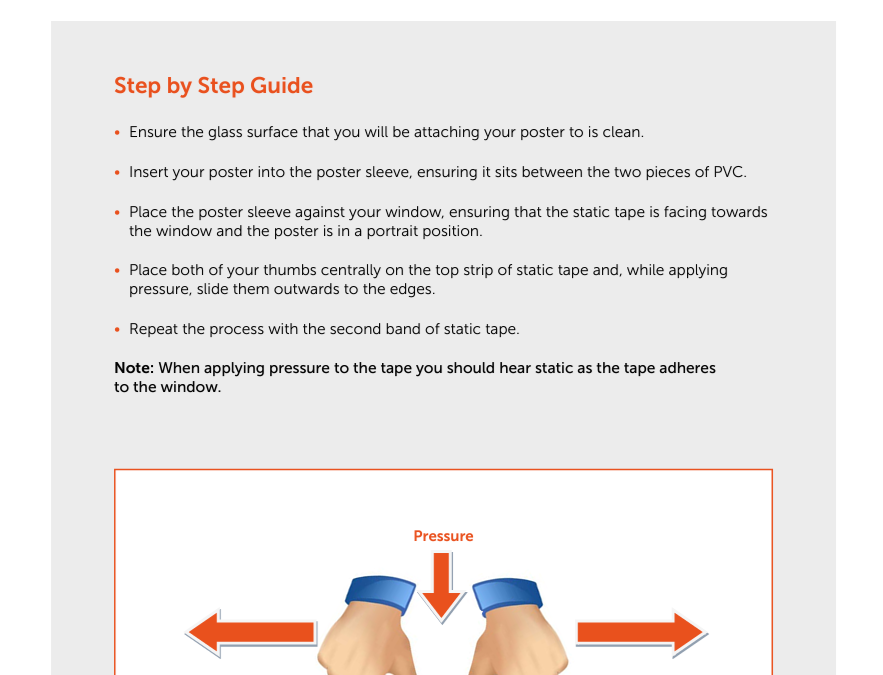
- Place both of your thumbs centrally on the top strip of static tape and, while applying pressure, slide them outwards to the edges.
- Repeat the process with the second band of static tape. Note: When applying pressure to the tape you should hear static as the tape adheres to the window.