
Occasionally, it will be necessary to restart the router. For example, if there is no internet access when you arrive, and restarting the desktop or laptop does not resolve the issue, or when the CCTV remote feed is not working properly.
Here is how to do it safely.
If the cafe is operating and the baristas are using the Zettle card reader, ask them to switch from using WiFi to using 3G/4G. If they don’t know how to do that, ask them to check the instructions in the cafe folder.
Once they have made the switch, you need to find two keys in the key cupboard:
the key to the Server Box
the key to corridor cupboard number 10
Once cupboard number 10 is open, use the server box key (white key fob) to open the scary-looking electronics cupboard containing all of the telecommunications equipment.
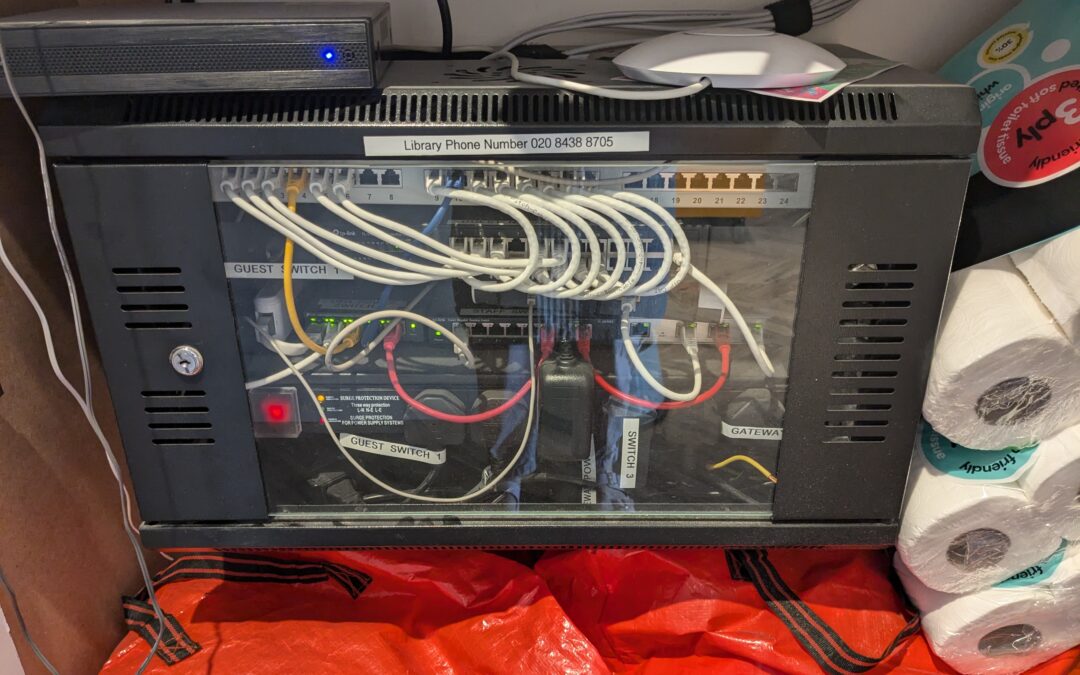
The Server Cabinet is black and glass fronted. This is what it looks like (above).
Locate the on/off switch, cunningly hidden under a large square plastic cover.
Remove the cover to reveal the large scary looking on/off switch. It has a red light on it.
Toggle the on/off switch to the off position and count slowly to 10.
Once you’ve counted slowly to 10, toggle the switch back to the on position and replace the square cover. It will make a terrifying long beeping noise. This is normal, do not be alarmed.
Lock the Server cabinet
Lock cupboard number 10.
Replace both keys in the key cupboard
Wait 2-3 minutes for everything to boot up again and then try connecting to the internet.
Let the baristas know they can switch back to Wifi.